
Did this article help you? Let me know in the comments. To compile Qt 5 using Visual Studio easily Compiling Qt 5 can become annoying, as it's nothing but a routine task that could be time wasting. Here I'll introduce a batch script that compiles Qt 5 from its git repository for me and for all those interested. The following is the batch script, and after it you'll find instructions on how to use it:
@echo off
set "qtver=%1"
set "prefix=Qt"
set "suffix=_src"
set "buildSuffix=%2"
set "folder=%prefix%%qtver%%suffix%"
if "%buildSuffix%" == "" set compilefolder=%prefix%%qtver%
if NOT "%buildSuffix%" == "" set compilefolder=%prefix%%qtver%_%buildSuffix%

if "%qtver%" == "" goto :leave

CALL git clone https://code.qt.io/qt/qt5.git %folder%
CALL cd %folder%
CALL git checkout .
CALL git checkout %qtver%
if NOT %ERRORLEVEL% == 0 goto :errorcheckout
CALL perl init-repository
CALL cd ..\
echo Download done... press enter to start compiling.
pause

set PATH=%cd%\%folder%\bin;%PATH%
set QTDIR=%cd%\%folder%\qtbase
mkdir %compilefolder%
call cd %compilefolder%
set QMAKESPEC=win32-msvc2013
set CL=/MP
CALL ..\%folder%\configure -developer-build -confirm-license -debug-and-release -opensource -platform %QMAKESPEC% -opengl desktop -static -nomake examples -nomake tests -mp -qt-zlib -qt-pcre -qt-libpng -qt-libjpeg

CALL nmake
::CALL nmake clean

:leave
if "%qtver%" == "" echo Please enter a version as the first parameter, and the build directory suffix as the second parameter
exit /b 1

:errorcheckout
echo Checkout error... The version you chose does not exist exiting
exit /b 1
Important: Starting from Qt 5.7.0, the options -c++11 doesn't work anymore, so remove it from configure. This is because c++11 became a requirement at that release. Notice the following: 1- Notice that :: before any line means it's commented. 2- Notice also that this compiles a static version of Qt. You're free to modify it! 3- I commented the command "nmake clean", which you can enable. I commented it to ensure that compilation went fine before I do a clean up. A clean up is necessary, as it saves many GB of diskspace. 4- I don't compile demos and example because they take huge diskspace with no benefit. Again, you're free to modify this. 5- Don't forget to change the following line with the correct version of your visual studio.
set QMAKESPEC=win32-msvc2013Simply save the contents of this in a batch file, for example DownloadQt.bat, put it in a new, empty folder, and then execute it after following the following instructions. The execution command is:
DownloadQt.bat <qt version> <compiled folder suffix>For example, if you run the following:
DownloadQt.bat 5.5.0 64_VS2013This will download the source to Qt5_src, and then create a new folder called Qt5.5.0_64_VS2013, where the compiled source is put. I use the suffixed to add information about VS version and whether it's 32 or 64 bit.
Requirements
1- Git 2- Perl (I recommend strawberry Perl) 3- Windows SDK 4- Visual Studio or C++ Express (this you can get for free from Microsoft, but I assume you know enough about this already since you're here) IMPORTANT: It's very recommended that you add git and perl to the %PATH% environment. The installers will ask you to do that, so accept it! They're doing you a favor! Otherwise you'll have to do it manually later.
32-bit or 64-bit?
Whether you'd like to have a 32-bit or 64-bit version of visual studio used depends on the environment variables that are defined. The easiest way is to run the run command prompt for the version you want. For example, in Visual Studio 2013, if one goes to Start, then types in quick search "Visual", you'll find a folder called "Visual Studio Tools". This folder will have both command prompts with the relevant environment variables. The following shows this folder:
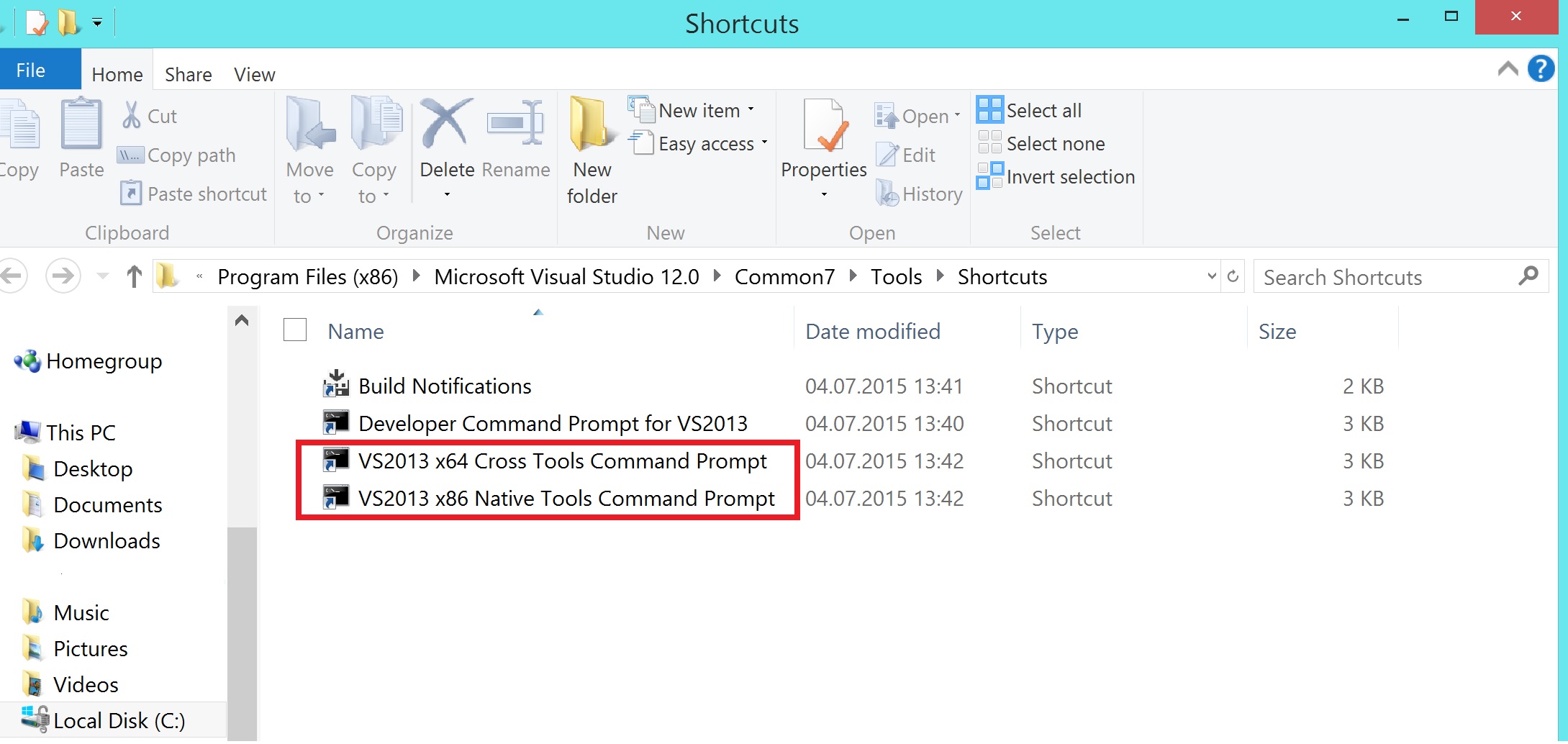
It's important that you compile Qt from such a command prompt. PS: As far as I remember, Visual Studio 2010 Express and earlier doesn't provide a 64-bit version (unless paid for).
Caveats about perl version
Perl is necessary because the Qt 5 repository is a git repository with submodules. Manually downloading the submodules could be annoying, so the Qt people created a perl script to do the job for you. Git for Windows comes with a version of perl. This version could be old and could cause problems. If you execute the script and it fails in downloading Qt source from the repository, you have to make sure of a few things:
- Make sure that git is in %PATH% environement variable. When you're in the VS201x command prompt, just execute "git". If that creates a problem in the form of "not found", then you should add git's bin folder to path using
set PATH=C:\Program Files (x86)\git\bin;%PATH%Remember to replace the path with your git path. 2) After ensuring git is in %PATH%, try running the batch script. If you get an error, this most likely means that the perl version is an old one that is taken from the git directory. To fix this, go to git's bin folder, supposedly:
C:\Program Files (x86)\git\binand change the file name "perl.exe" to "perl1.exe". This works fine. If you're unconfortable with this, you can restore it after compiling your version of Qt 5. 3) Ensure that perl is also in path. Just run "perl" in your VS201x command prompt. Again, if it creates a problem, then you have to add "C:\Strawberry\perl\bin" to your %PATH%.
Modifying Qt before compiling?
The script is made to download and compile. To give you a chance to modify the downloaded source for any reason, the script notifies you and pauses after downloading the source and expects a key pressed from your side. For example, you may wanna edit the following file in the downloaded source
qtbase/mkspecs/common/msvc-desktop.confBy changing the following lines
QMAKE_CFLAGS_RELEASE = -O2 -MD
QMAKE_CFLAGS_RELEASE_WITH_DEBUGINFO += -O2 -MD -Zi
QMAKE_CFLAGS_DEBUG = -Zi -MDd
To the following:
QMAKE_CFLAGS_RELEASE = -O2 -MT
QMAKE_CFLAGS_RELEASE_WITH_DEBUGINFO += -O2 -MT -Zi
QMAKE_CFLAGS_DEBUG = -Zi -MTd
This will make the compliled Qt version really static against the compiler standard library. Otherwise you'll require the runtime.